Expected GP help
First click on the "Expected GP" button, and then enter the sales mix % of your 3 highest selling categories of products.
What is "Sales Mix"? A. It is just the percentage of your overall sales that come from different categories. These 3 don't need to add up to 100%.
For a bar some of those categories might be: draught beer, bottle beer, wine, spirits, soda. For a convenience store they might be sweets, crisps, cigarettes, soda, sandwiches, ice cream, toiletries, etc.
So if 35% of your sales were draught beer, 16% was bottle beer, 11% was soda, 9% was wine, 6% was food etc, then you would enter "Draught Beer" in the "Largest Group Name" box, and "35" in the "Sales Mix %" box. Then "Bottle Beer" in the "2nd Largest Group Name" box, and "16" in the "Sales Mix %" box. Then "Soda" in the "3rd Largest Group Name" box, and "11" in the "Sales Mix %" box. The sales mix percentages can be estimated, but do your best for them to be fairly accurate. After you have done this, click the "Next" button.
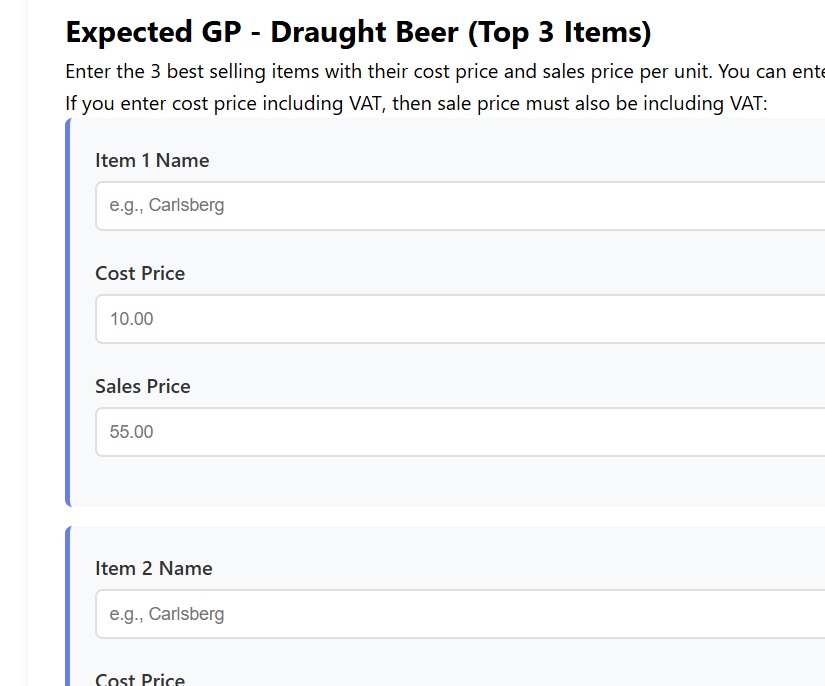
Then enter the top selling items in each of those sale mixes. So for Draught Beer, maybe your biggest seller was Carlsberg. You would therefore enter that in the top box on the next page (the page headed "Draught Beer (Top 3 items)"). Enter the cost price and sale price for this item. You can enter the prices both ex-VAT, or the prices both incl-VAT. It doesn't matter which, but be consistant. The cost price and sale price of 1 particular item should always have the same VAT application (i.e. BOTH ex-VAT or BOTH incl-VAT). Then preceed to do the same for your 2 other biggest sellers in Draught Beer (in this example). Then click the "Next" button.
Next you will be asked for your 2 top sellers in Bottle Beer. Let's say Budweiser was your top seller (enter "Budweiser", with cost and sale price). And let's say Miller was the 2nd biggest seller in bottle beer (enter that, with cost price and sale price). Again click the button.
Lastly you will be asked for your top seller in soda. Let's say cola (with cost price and sale price).
Once all those are entered, click the "Calculate Expected GP" button and the software will then calculate an estimate of what to expect from your gross profit. If your actual GP% is a lot different than your Expected GP% then you know you should be spend some time investigating. Things like wastage and theft can sadly get very high if it is not monitored, and inaccurate invoicing vs supply can be devastating, so aim if possible to do an Expected GP at the same time you calculate the stock result.
The result of this Expected GP will be added to your results history. So you can compare it with your actual stock result from there.